Label Annotation/Drawing Panel
This panel provides the ability to annotate Regions of Interest (ROIs) and save them as masks.
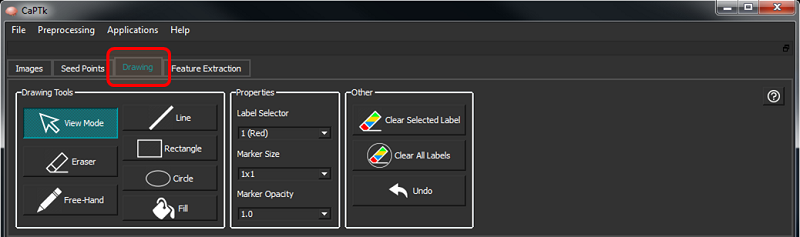
Drawing functions
Toggle between non-zero (taken from the opacity box) and zero opacity of the entire annotated mask by using the keyboard key "m".
Visualize a single label using "Control + <label number>" and add labels to the visualization using "Alt + <label number>". To reset, press "Control/Alt + 0".
There are the following controls underneath the Drawing tab:
| Button/Box | Description |
|---|---|
| View Mode | Switch from drawing mode (which is enabled when either Near or Far ROI drawing is selected) to normal viewing mode. |
| Line | Draw a line of selected label color and size. |
| Rectangle | Draw a rectangle of selected label color and size. |
| Circle | Draw a circle of selected label color and size. |
| Free-Hand | Draw selected label using brush of specified size using mouse left button drag. |
| Fill | Fill a closed boundary with selected label - uses ITK's connected component filter. |
| Eraser | Erases all labels using brush of specified size. |
| Label Selector | Label selector between 1-9. |
| Marker Size | A square marker of specific voxel size. |
| Marker Opacity | Sets the opacity of the marker between 0.0 (transparent) and 1.0 (opaque). |
| Clear Selected Label | Remove selected label completely from the mask. |
| Clear All Labels | Remove all labels completely from the mask. |
| Undo | Undo last drawing action. |
| Change Values | By providing the same number of old and new values in the format AxBxC, the values of the annotated region can be quickly changed. |